AI and Education: Insights from the UNESCO South Asia Hackathon

How AI is designed and integrated into education can have different consequences for different communities. Whose needs, experiences and perspectives shape its use, who benefits and whose interests risk being overlooked? In this article, Prof. John Traxler reflects on the latest AI and Education hackathon, organised by the University of Manchester on behalf of UNESCO, which brought together educators, managers and developers from across South Asia to explore AI, design justice and its implications for education.

AI and Education: Insights from the UNESCO South Asia Hackathon

Author: Prof. John Traxler, UNESCO Chair, Commonwealth of Learning Chair and Academic Director of the Avallain Lab

St. Gallen, October 29, 2026 – For the past four years, the Digital Technology, Communication and Education (DTCE) group at the University of Manchester has organised a ‘hackathon’. On behalf of UNESCO, this series of webinars, discussions, activities and group projects explored the theme of ‘AI and Education’. 

In 2026, the hackathon brought together over 100 participants from the public and private sectors, including educators, managers and developers, from across South Asia. 

One of the hackathon’s underlying aims was to promote ‘design justice’ in AI and education by enabling participants to examine, challenge and confront how AI in education reinforces power structures, systemic inequality and the marginalisation of communities, cultures and countries, including everyday practices within schools, colleges and universities.

Understanding Design Justice

Design justice is an approach that examines how technologies and systems can reinforce or challenge existing inequalities. It recognises that decisions about how technologies are designed, developed and implemented are not neutral, and that these decisions can have different consequences for different communities.

Design justice is also a response to the perceived economic attractions of scale delivered by global digital technologies, to the distractions of ‘localisation’ that seem like a technical fix for ‘one-size-fits-all’ technologies and to the ways these threaten less powerful or technologically savvy communities and cultures outside the global mainstream. Design justice, as the name suggests, is an ethical response to an ethical threat.

Central to this approach is involving those most affected by a technology in shaping its development. In education, this means considering whose needs, experiences and perspectives inform the use of AI, who benefits from it and whose interests might otherwise be overlooked. 

Putting Design Justice into Practice

As part of the hackathon, participants worked in groups. They were assigned projects to produce and present end-of-course artefacts, for example, posters, reports, presentations or videos. Each group was supported by a university mentor and tasked with analysing the needs of a specific group or community, for example, teachers or parents in their own country or culture, and producing something useful for that group or community. 

This demonstrated how design justice could be put into practice, not as an alternative universal prescription but as methods and tools that could be adopted and adapted. In that respect, the hackathon demonstrated the processes, not the products. Putting design justice into practice around educational AI is not just timely but uniquely challenging. Not only is most of the data AI trains on skewed and biased, away from the values, languages, ideas, knowledge and experiences of most of the world’s communities and cultures, but so is the way AI processes and ‘reasons’ this data. 

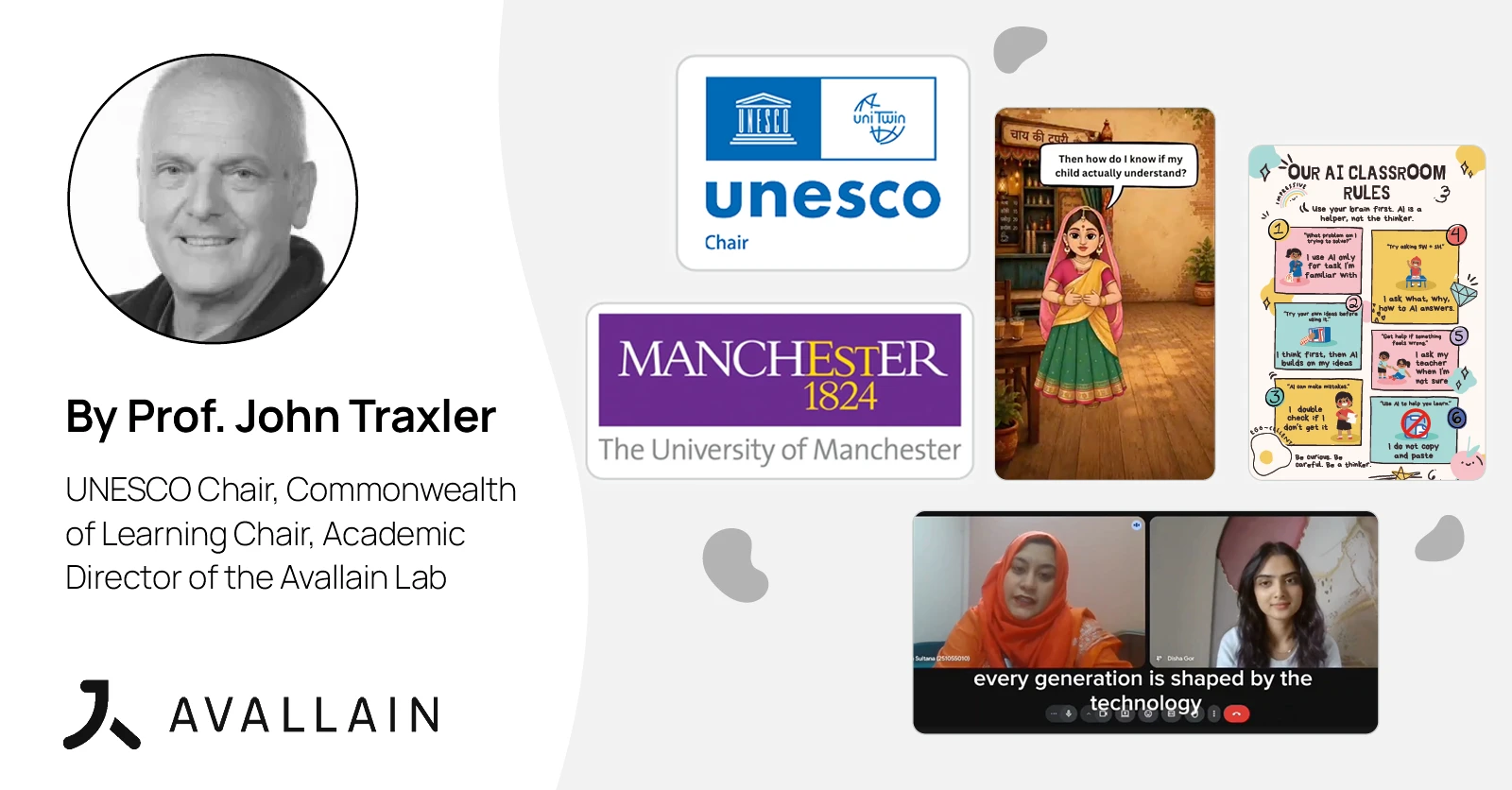
For example, one group presentation followed the process from engaging with their target audience, university students, to designing a series of posters that met the needs they uncovered. Another approach was to build a teaching resource or lesson plan based on the reported problems with AI use. Both show local resources growing out of local needs, in spite of the easy access to distractions of web-enabled, mobile-friendly but biased chatbots such as Claude and Gemini.

These artefacts were often very accessible, colourful and visual. Many also reflected a cautious or critical approach, rather than advocating for an uncritical adoption or exploitation of AI in education. There was recurring emphasis on and determination to preserve human agency and engagement wherever AI was used.  

The artefacts took different approaches. Some were practical, aimed at students, teachers and parents in their day-to-day lives; others were more critical, drawing attention to the harm and bias associated with overly naive or optimistic AI adoption.

Participants worked remotely from their respective countries, collaborating across multiple time zones while navigating poor connectivity and the demands of their jobs and studies. Mixing the group composition was a tactic to foster cross-cultural collaboration and understanding, but perhaps a more purist approach would be to have homogeneous groups, each drawn from one specific culture or community.

Exploring Key Hackathon Artefacts 

Some of the most visual artefacts included this enchanting sequence of cartoons helping Indian parents, at their local chai stall, learn about the AI their children might use: firstly, the parents gather for chai; then, as a consequence, provide help with homework, warn about sharing personal information and get encouraged to stay involved; and then finally, gather back at the stall to recap. This was based on findings within the community.

The cartoons illustrate how familiar cultural settings and everyday experiences can make discussions about AI more relevant and accessible. Rather than approaching AI literacy as a purely technical subject, the resource connects it to parents’ existing roles in supporting their children’s education. 

Notions of literacy, recently digital literacy and now increasingly AI literacy, have a substantial and somewhat controversial history, dating back at least into the UK literacy campaigns of the 1970s. The issues and tensions, however, remain the same, as much in India now as in the UK then. Is literacy about skills, practices, and information, about know-how, necessary to use the medium competently, to engage with reading the written page, the computer screen or the AI chatbot, or is it about criticality, about questioning the page, the screen and the chatbot, about know-why? These tensions have always had a political dimension, recycled through the successive technologies, because they potentially challenge what is being taught, what is being consumed and what is being accepted, same then, same now.  

The current cartoons not only make these points in terms of familiar cultural settings and everyday experiences but should remind us that those settings and experiences are not universally comparable or equivalent. 

The need for and nature of AI literacy, especially the kind of critical AI literacy that encourages people to question and challenge answers, varies across cultures and contexts. It is also worth considering how the values and ideas of global AI corporations may influence approaches to AI literacy, and whether these always reflect the needs and priorities of local communities.
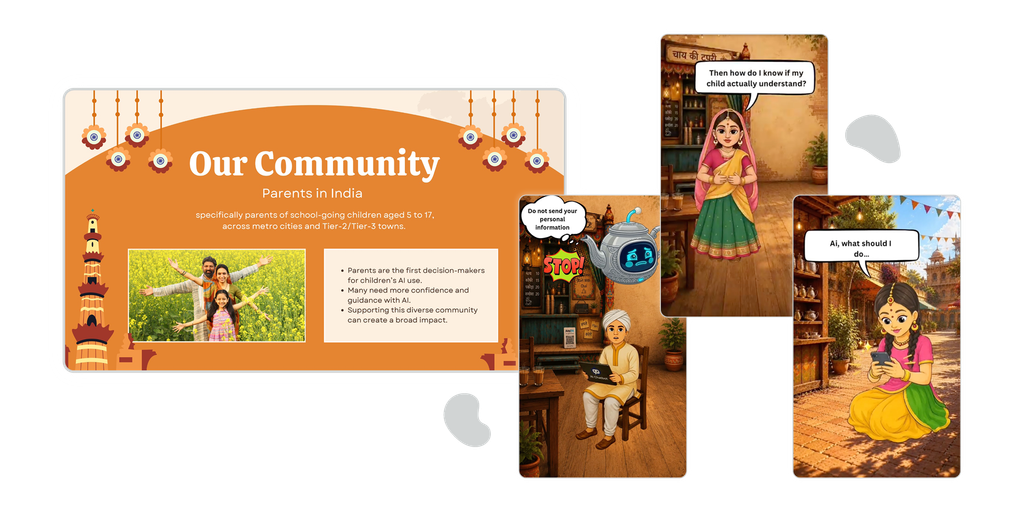
Collage from Parents and AI in India - Reels and Presentation

Meanwhile, in another video, a student under pressure to submit an assignment blindly trusts AI and needs guidance to use it more responsibly and critically.

Other artefacts used vox-pop sequences with a range of people in their country, Bangladesh, for example. They discussed their experiences and attitudes to AI in their lives and their work, illustrating how pervasive and accessible AI has become in parts of South Asia.
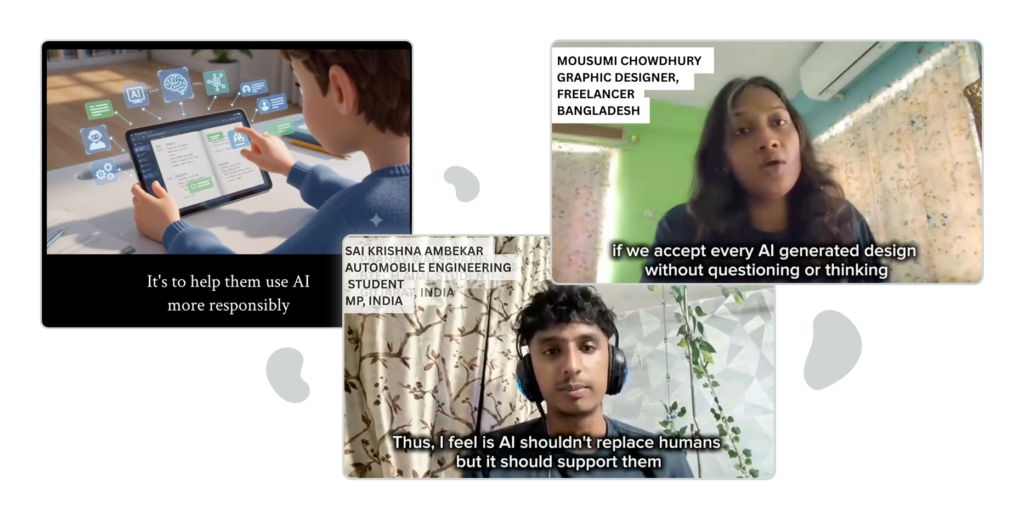
Collage of students under pressure and open discussions

This group of posters come with a toolkit for teachers; the emphasis here is on teachers and learners recognising that AI must support human agency, not replace it. Another set of posters, entitled ‘AI for teachers’, supports AI choice, discusses AI in traditional teaching, and covers creating lesson plans and tests while staying aware of security and ethics.
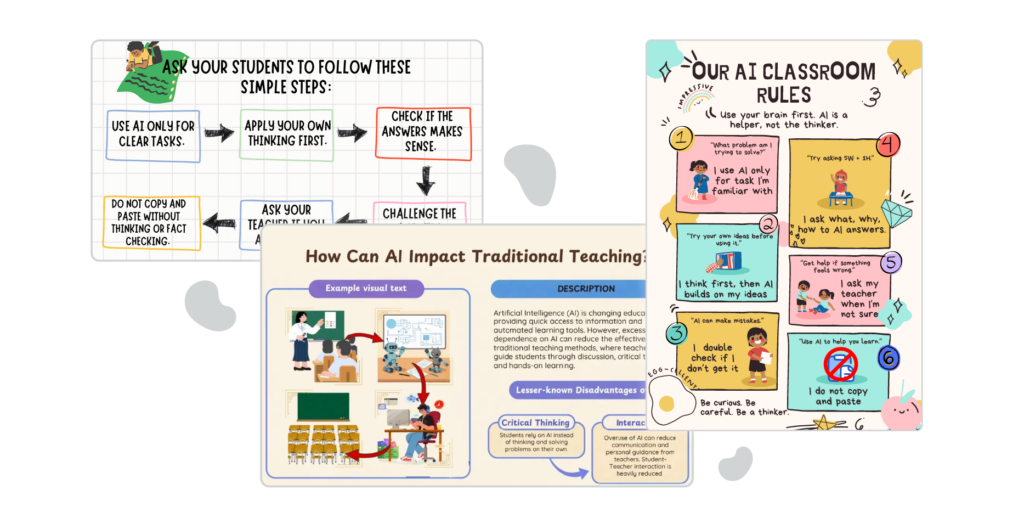
Collage of posters and toolkits

This presentation takes a more critical stance on cultural bias in AI, especially for teachers and learners in Asia. The team raised important questions about whose languages, cultures and perspectives are represented in AI systems and how potential biases might influence the educational content and information these technologies produce. 

Reflection and Outcomes

Looking back on the hackathon and reflecting on participant feedback suggests it was a hugely successful attempt to help a very disparate group work together, think through the deeper implications of AI for education in their communities, and show that this can lead to practical, tangible outcomes. 

Beyond the artefacts themselves, the hackathon raises wider questions about whose experiences and perspectives shape AI in education, how communities can participate meaningfully in its development and how educators can preserve human agency as these technologies become more widespread.

Institutional Context and Bias

We must also acknowledge that the hackathon was organised within an institutional context that brings its own perspectives and bias to discussions about AI and education. As a university based in the Global North, the University of Manchester operates within particular academic and institutional traditions. Even if a university in the Global South hosted the hackathon, it could still be argued that it buys into a specific globalised version of higher education that might not align with the values and ideals of different local cultures, communities, castes and classes. 

UNESCO, too, operates within an institutional framework that serves the interests of its Member States, whose governments play a central role in determining its policies and priorities. So who is truly being represented, and do the discussions about AI in education give sufficient attention to learning beyond the formal national education systems? UNESCO publications often present learning as something that happens only within these systems. This means groups of people, often women, girls and minority groups, are ignored, overlooked, disadvantaged or failed by education systems or that people whose learning takes place informally beyond the reach of teachers are also overlooked.

In terms of digital learning, much learning through personal technologies and social media may take place without sufficient guidance or critical engagement. Similar concerns now arise with AI, as its widespread use raises questions about how to support individuals to engage with these technologies thoughtfully and responsibly.

The hackathon has made a contribution to these discussions, and its message can continue to inform wider thinking about AI and education.

Design Justice and the EdTech Industry

It might also be the case that design justice is treated as a fringe luxury, rather like organic vegetables, workers’ cooperatives and open-source systems, in the face of established global systems, methods and practices, and in the case of design justice in educational AI, we must surely ask about the relationships between design justice and the edtech industry. Might there be synergy and overlap; can either side learn from the other? Could the edtech industry acknowledge and incorporate local perspectives without merely appropriating and exploiting them? Even with an authentic willingness, this will be a challenge, given that the edtech industry is downstream of massive, unresponsive AI corporations over which it has little influence. 

While design justice is possible and while this hackathon focused on communities in South Asia, why not also consider how these principles can be applied to other communities whose perspectives may be overlooked, including the neurodiverse, the indigenous, the homeless and the Traveller communities?

Supporting the hackathon was part of Avallain Lab’s ongoing work exploring the ethical, cultural and pedagogical implications of AI across diverse educational contexts, in collaboration with leading academics and universities. These insights also contribute to the broader research and ethical foundations of Avallain Intelligence, Avallain’s framework for the responsible use of AI in education, which prioritises human agency, fairness and the safe, inclusive use of educational technology.

The Background to the Hackathon

There were 120 participants from 11 institutions: University of Manchester; University of Liberal Arts Bangladesh; University of Dhaka, Bangladesh; University of Kathmandu, Nepal; Key Academy, Nigeria; Mahidol University, Thailand;  Universitas Kristen Satya Wacana, Indonesia; Maldives National University, Maldives; Royal University of Bhutan, Bhutan; University of Colombo, Sri Lanka; Symbiosis Skills and Professional University, India. 

In this year’s iteration, the organisers intentionally encouraged interdisciplinary cohorts where possible, drawing from education, social sciences, humanities, policy or technology-related programmes. 

UNESCO South Asia supported collaboration between participating universities, and each institution identified focal-point colleagues who supported recruitment, onboarding, attendance and communication with participants locally. Dr Taslima Ivy, Mehdi Hassan and Martyn Edwards organised successive hackathons, assisted by Jian Xi Teng: Programme Specialist (Education) for UNESCO South Asia, Norihide Furukawa: Head of Education, UNESCO Dhaka, and Gazi Fabiha Noshin Meem, Education Consultant at UNESCO Dhaka, many of whom were involved in a parallel seminar.

The expert and scholarly contributions were as follows:

‘Frameworks for AI Literacies: A Comparative Analysis of UNESCO’ and ‘The OECD Literacies: A Comparative Analysis of UNESCO and the OECD’ from Susan Robertson, Professor of Sociology of Education at the University of Manchester, and Dr Michele Martini, Postdoctoral Fellow at the Faculty of Communication, Culture and Society at the Università della Svizzera italiana (USI)

‘Against the Grain of Corporate Hype: Strategies for Critical and Grounded Teaching about the Impact of Generative AI on Learning, the Environment and Society’ from Eleanor Dare of Cambridge Digital Humanities, University of Cambridge

‘Transformative learning from a sustainability perspective: An essential fundament to AI use and competencies?’ from Amanda Banks Gatenby and Susan Brown, University of Manchester,  Alex Dunnedin from the Ragged University

‘Assessment: what is it good for?’ followed by ‘Putting Enjoyment Into Assessment: Or How I Learned To Stop Worrying And Live With AI’ from Drew Whitworth and Martyn Edwards, University of Manchester 

‘Dialogic Educational Futures: Foundations for Critical Design in an Uncertain AI Landscape’ from  Louis Major, University of Manchester 

‘AI literacies and Global Justice’ from Helen Beetham with Duncan Ivison, Vice Chancellor, University of Manchester 

‘Ensuring Inclusivity and Equality in AI Competency Building: Insights from Global Higher Education Contexts’ from Skye Zhao, University of Manchester, Fengchun Miao, Chief, Unit for Technology and AI in Education, UNESCO and Melti Oktavianda, Manchester Institute of Education, University of Manchester

‘Decolonising Educational AI’ from me, Prof. John Traxler, plus the chance to serve as discussant for most sessions.


About Avallain

For more than two decades, Avallain has enabled publishers, institutions and educators to create and deliver world-class digital education products and programmes. Our award-winning solutions include Avallain Author, an AI-powered authoring tool, Avallain Magnet, a peerless LMS with integrated AI, and TeacherMatic, a ready-to-use AI toolkit created for and refined by educators.

Our technology meets the highest standards with accessibility and human-centred design at its core. Through Avallain Intelligence, our framework for the responsible use of AI in education, we empower our clients to unlock AI’s full potential, applied ethically and safely. Avallain is ISO/IEC 27001:2022 and SOC 2 Type 2 certified and a participant in the United Nations Global Compact.

Find out more at avallain.com

_

Contact:

Daniel Seuling

VP Client Relations & Marketing
dseuling@avallain.com

Designed for Young Learners: Building Primary Learning Experiences with Magnet Kids and Mercury Primary

Digital learning for younger learners brings its own set of considerations. Access needs to be simple, navigation needs to feel age-appropriate, and parents and educators need the right tools to support learners without adding unnecessary complexity. In the fifth session of Avallain’s Product Webinar Series, David Moxon and Stephen Madden demonstrated how Avallain Magnet addresses these needs through Magnet Kids and Mercury Primary.

Designed for Young Learners: Building Primary Learning Experiences with Magnet Kids and Mercury Primary

St. Gallen, October 2026 – In the fifth session of Avallain’s Product Webinar Series, ‘Designed for Young Learners: Building Primary Learning Experiences with Magnet Kids and Mercury Primary’, David Moxon, Learning Technology Specialist and Content Developer, and Stephen Madden, Senior Business Development Manager, demonstrated how Avallain Magnet can provide a digital learning environment designed around the needs of younger learners.

Moderated by Giada Brisotto, Senior Marketing and Sales Operations Manager, the webinar followed the experience from the learner perspective through to institution configuration and adult support. The session explored simplified access, the Magnet Kids learner interface, learning content presented with Mercury Primary, Teacher Admin tools and the dedicated Parent role.

Simplifying Access for Younger Learners

The webinar opened with a live demonstration comparing the standard Avallain Magnet interface with the experience designed for younger learners.

Stephen demonstrated how a child can access Magnet Kids using a School Badge rather than relying on an email address and conventional password. Each badge contains a QR code that can be scanned using the camera on a computer, tablet or mobile device.

When scanning isn’t convenient, the same badge can be stored on the learner’s device. Stephen demonstrated this workflow by selecting a saved badge directly from the device and entering Magnet Kids without having to type login credentials.

This provides institutions with different ways to make access more manageable for younger learners, while retaining alternative login options when needed.

Creating a Simpler, Personalised Learner Experience

Once signed in, the difference between the standard interface and Magnet Kids became immediately visible.

The Magnet Kids dashboard uses a simpler layout, larger interface elements and navigation designed with younger learners in mind. From the dashboard, learners can see their groups and courses and move directly into their learning content.

The session also demonstrated how learners can personalise parts of the experience. Stephen showed how a learner can choose an avatar and change the colour displayed in the dashboard header.

These choices do not change the learning content itself, but they give younger learners a simple way to make the environment feel more personal. Importantly, the institution determines the available options, giving administrators control over what learners can choose.

Presenting Learning Content with Mercury Primary

The webinar then moved from the Magnet Kids dashboard into the course experience itself.

Stephen demonstrated activities presented with Mercury Primary, which provides a content player designed for younger audiences, with clearer navigation and larger controls.

Three different examples showed how this works across different types of learning activities.

In a labelling activity, the learner selected words and matched them with the appropriate parts of an image before checking their answers.

A second activity focused on telling the time. Learners could manipulate the hands of a clock to respond to questions, providing an interactive way to practise a skill particularly relevant to younger age groups.

The final example asked learners to identify and highlight verbs within sentences, demonstrating another type of interaction presented through the same primary-focused interface.

The session also highlighted that Mercury Primary is responsive across desktop, tablet and mobile devices. This lets learners move between different devices while retaining the functionality of the learning experience.

Configuring Magnet Kids for Different Institutions

David then moved behind the learner experience to demonstrate how Magnet Kids is configured within Avallain Magnet.

An Organisation Admin first enables Kids Mode at platform level. Magnet Kids can then be activated for the specific institutions that need the young learner interface.

This means an organisation does not need a separate learning management system for different learner groups. The same Avallain Magnet platform can support institutions designed for younger learners alongside institutions serving older or adult learners.

Once an institution enables Magnet Kids, the learner interface changes without administrators having to configure individual interface sizes or navigation elements manually.

The demonstration also showed how institutions can manage personalisation options. Administrators can create avatar collections, upload their own characters and define the dashboard colours learners can choose from.

These settings connect directly with the personalisation options showcased earlier from the learner perspective.

Supporting Learner Access with Teacher Admin Tools

The webinar then explored several tools designed to help teachers and Teacher Admins manage access for younger learners.

If learners lose their School Badge or forget their usual password, a temporary login password can be generated for the group. This provides a practical fallback when learners need to access the platform without their normal credentials.

Teacher Admins can also generate School Badges for individual learners or download badges for an entire group, making it possible to prepare access for a whole class.

The session also looked at learner creation. Young learners don’t need their own email address to use Magnet Kids. A username can be used instead, which is particularly useful when working with children who don’t yet have individual email accounts.

For larger groups, learner information can be imported in bulk using a dedicated template. Parent information can also be included as part of this process.

Together, these tools give institutions different options for setting up and supporting young learners while keeping access manageable in everyday teaching situations.

Giving Parents Visibility into Learning and Progress

The final part of the session focused on the dedicated Parent role in Avallain Magnet.

Stephen logged in as a parent and showed how parents and guardians can see the children associated with their account. Additional parents or guardians can also be invited, allowing several adults to be connected to the same learner where appropriate.

From the Parent view, adults can see the learner’s courses, overall progress and results from individual activities.

Stephen demonstrated how a parent can move from the overall course view into individual learning activities to see where a child has performed well and where they may have encountered difficulties.

Importantly, this access is read-only. Parents can review the learner’s work and progress without changing the learner’s answers, scores or course data.

This gives parents visibility into learning when they need it while keeping the learner experience and learning record separate.

One Avallain Magnet Experience for Different Learner Needs

The webinar showcased how supporting younger learners involves more than changing the appearance of a course.

Magnet Kids addresses the broader learning experience, from access and navigation to personalisation and adult support. School Badges provide an alternative to conventional login credentials; the learner interface reduces unnecessary complexity, and institutions retain control over available personalisation options.

Mercury Primary extends this approach into the course itself, presenting learning activities through an interface designed for younger audiences.

At the same time, Teacher Admins have tools to manage access, users and School Badges, while parents and guardians can gain appropriate visibility into learning and progress.

For educational publishers, schools and other digital education providers, these capabilities make it possible to support younger learners within Avallain Magnet without requiring a completely separate platform for different age groups.

The result is a more coherent digital learning journey for younger learners and the adults supporting them.

Watch the Webinar Recording

Watch the full webinar recording to see Magnet Kids and Mercury Primary in action, from simplified learner access and dashboard personalisation to institution configuration, Teacher Admin tools and the dedicated Parent experience.

Continue the Conversation in Our Next Webinar

Our Product Webinar Series continues with the next live session:

Interactive, Inclusive and Accessible: Creating Digital Learning Content for Everyone with Avallain Author

Hosted by:

  • Julia Pidgeon, Product Manager, Avallain
  • Stephen Madden, Senior Business Development Manager, Avallain

Moderated by:

  • Giada Brisotto, Senior Marketing and Sales Operations Manager, Avallain

🗓 Wednesday, 18th November
🕒 14:00 – 14:30 GMT | 15:00 – 15:30 CET

With accessibility becoming an increasingly important consideration in digital educational publishing, including in the context of the European Accessibility Act (EAA) and the Americans with Disabilities Act (ADA), this session will explore how Avallain Author makes accessibility a practical part of content creation without compromising creativity, interactivity or editorial control.

In this 30-minute live webinar, we’ll demonstrate accessibility features across Avallain Author, including audited Activity Types, responsive Design Packs, Accessibility Controls and AI-powered features such as AI-generated alt text, subtitles and transcripts.

Together, we’ll look at how publishers, content teams and institutions can consider accessibility more consistently throughout the content creation process, helping them create digital learning content with a wider range of learner needs in mind while maintaining control over their content and workflows.

Click below to register and secure your spot.


About Avallain

For more than two decades, Avallain has enabled publishers, institutions and educators to create and deliver world-class digital education products and programmes. Our award-winning solutions include Avallain Author, an AI-powered authoring tool, Avallain Magnet, a peerless LMS with integrated AI, and TeacherMatic, a ready-to-use AI toolkit created for and refined by educators.

Our technology meets the highest standards with accessibility and human-centred design at its core. Through Avallain Intelligence, our framework for the responsible use of AI in education, we empower our clients to unlock AI’s full potential, applied ethically and safely. Avallain is ISO/IEC 27001:2022 and SOC 2 Type 2 certified and a participant in the United Nations Global Compact.

_ 

Contact:

Daniel Seuling

VP Client Relations & Marketing
dseuling@avallain.com

Building More Reflective, Collaborative Writing Lessons with Purpose-Built AI

The latest Language Teaching Takeoff Webinar welcomed back freelance teacher trainer and AI in education specialist Joanna Szoke to explore how self-assessment, peer review and teacher feedback can work together to make writing assessment more active, reflective and beneficial for learners.

Building More Reflective, Collaborative Writing Lessons with Purpose-Built AI

London, October 2026 – In ‘Effective AI Feedback: Self-Correction, Peer Review and Teacher Judgement’, Joanna Szoke explored how teachers can combine product and process approaches to writing, giving learners opportunities to analyse models, review their own work, learn from their peers and act on feedback before the teacher’s final assessment.

Moderated by Alba Melián, Marketing and Sales Operations Consultant at Avallain, the session also highlighted the value of using purpose-built AI critically. Through the ‘Model Answer’ and ‘Advanced Feedback’ generators in TeacherMatic for Language Teaching, Joanna showed how teachers can introduce AI into writing assessment without losing sight of pedagogy. This sequence gives learners opportunities to question, compare and reflect on different forms of feedback.

The Thinking Behind Teaching Writing

Joanna began by asking attendees to describe how they approach teaching writing. She asked: How do you teach writing? Do you enjoy it? Do you follow a particular method, or sometimes avoid it altogether?

The responses reflected a range of approaches, from product and process writing to model texts and short, regular writing tasks designed to reduce hesitation and build confidence. As one attendee put it, ‘writing is thinking.’

Joanna agreed, preferring to move beyond simply asking learners to ‘keep practising’. She highlighted the value of giving learners opportunities to analyse examples, notice useful language and structure, organise ideas, respond to feedback and improve through revision.

Joanna then explored where AI can add value within that process. Rather than replacing established teaching approaches, it can support them. Unlike generic AI, TeacherMatic for Language Teaching is designed specifically for language teaching. Teachers can work with established methodologies such as Communicative Language Teaching, the Lexical Approach and Task-Based Learning, responsibly bringing AI into their practice in a way that reflects their teaching context and preferred approach.

Product and Process Approaches to Writing

Joanna then compared two established approaches to teaching writing: the product approach and the process approach.

With a product approach, learners begin with a model text. They analyse its structure and language, often through text mining, to identify useful expressions and patterns they can draw on in their own writing. They then produce a similar text and compare their work with the model.

The process approach focuses on how the writing develops. Learners brainstorm, organise ideas, create drafts, receive feedback and revise, with feedback and reflection built into the process.

Joanna stressed that neither approach is inherently better. Their value depends on the context and the learning aim. A process approach can be especially useful when the aim is to develop thinking, reflection and critical engagement with writing. A product approach may work particularly well in areas such as business language, where learners need to understand the conventions of a specific text type. 

Building on the product approach, Joanna next explored how a dedicated AI tool can create model answers for learners to analyse and respond to.

Creating Model Answers with Purpose-Built AI

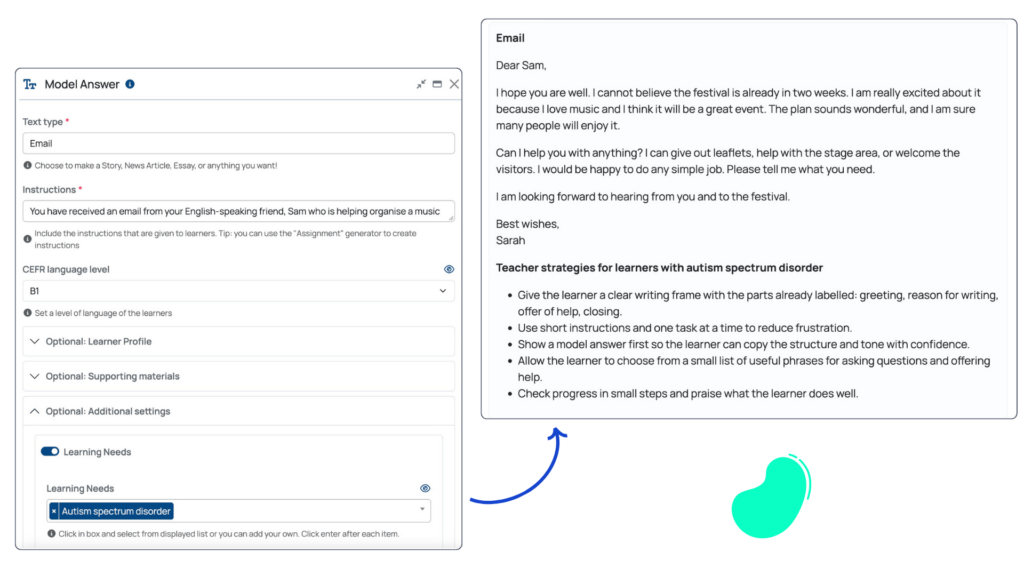
The ‘Model Answer’ generator allows teachers to create examples that reflect the task, level and learner context rather than relying on a generic prompt.

For her example, Joanna selected an email task, added instructions including the required word count and set the CEFR level to B1. She also added details about the learner profile, including an interest in extreme sports, and uploaded the original textbook email as supporting material for the generator to reference.

Model Answer Mockup Effective AI Feedback Self-Correction, Peer Review and Teacher Judgement

Additional settings let teachers account for specific learning needs. Joanna showed how the generator can provide teaching tips for learners with autism or dyslexia, offering practical suggestions that teachers can consider when planning how to use the model in class.

Once the model answer has been generated, Joanna emphasised the importance of reviewing the output carefully, checking that it follows the task instructions, word count and intended level before using it with learners.

She also highlighted options to refine the result, save it or download it for further use.

But, as Joanna stressed, the value of a model answer lies not simply in generating it, but in how teachers use it with learners.

Using Model Answers in the Classroom

Shifting the focus, Joanna moved from generating a model answer to how to use it in practice. Rather than treating the model as an end point, she showed how teachers can combine elements of the product and process approaches by building rounds of reflection and feedback around it.

She asked attendees to consider the order in which students, peers and teachers should contribute feedback. Joanna noted that this can depend on the teaching context and culture, but highlighted the value of asking learners to assess their own work before moving into peer review.

For peer feedback, she recommends practical approaches such as checklists or colour coding. Learners might identify features such as grammar, spelling or structure using different colours, with the emphasis on noticing rather than simply correcting.

The teacher then steps in to address recurring or more complex issues, clarify points of uncertainty and, where useful, bring common areas of difficulty into wider classroom discussion.

Joanna then showed how teachers can use TeacherMatic to extend this sequence, supporting the teacher’s final review while keeping feedback connected to the learner’s earlier reflection and peer input.

Taking Feedback Further with the ‘Advanced Feedback’ Generator

Joanna then demonstrated the ‘Advanced Feedback’ generator, which allows teachers to upload multiple submissions and apply either Cambridge-aligned or their own assessment criteria. She recommended obtaining student consent before uploading work.

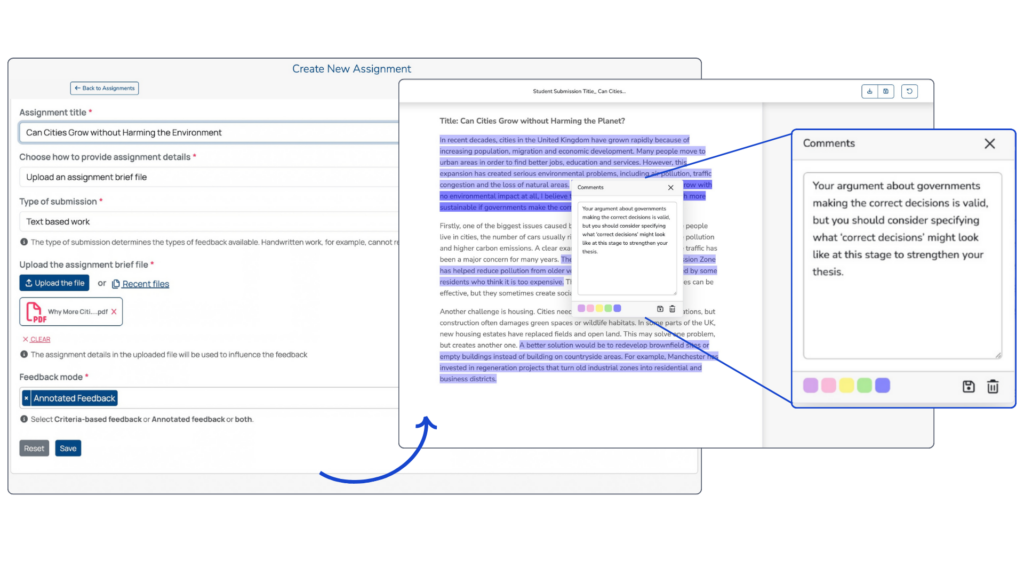
Teachers can add assignment details, upload typed or handwritten work and choose between different feedback formats, including annotated and comparative feedback.

Joanna showed how the generator produces an overview of the feedback, including suggested marks and grades, alongside a teacher report that can be reviewed and edited. The feedback is also broken down by assessment criteria, with a rationale for each mark, followed by top tips, action points and suggested follow-up activities tailored to the individual submission.

Advanced Feedback Mockup Effective AI Feedback Self-Correction, Peer Review and Teacher Judgement

She also demonstrated the annotated feedback option, which is designed to guide learners towards improvements rather than simply rewrite their work for them.

Throughout, Joanna emphasised that the generator should remain part of a teacher-led process, with teachers reviewing the output and deciding how best to use it with each learner.

For a deeper look at the ‘Advanced Feedback’ generator, watch Joanna’s earlier webinar dedicated specifically to this AI tool.

Bringing the Full Feedback Sequence Together

To round off the session, Joanna brought the different stages together into one practical task sequence:

  1. The teacher generates a model answer.
  2. Learners analyse the model, noticing features such as structure, syntax and useful language.
  3. Learners produce their own text.
  4. They complete a peer review using approaches such as a checklist or colour coding.
  5. The teacher uses the ‘Advanced Feedback’ generator to support individual feedback.
  6. Learners compare the teacher feedback with peer feedback and their own earlier reflections.

This comparison gives learners a broader view of their work and creates opportunities to develop AI literacy alongside writing skills. By considering where AI-supported, peer and teacher feedback align or differ, learners can think more critically about feedback rather than simply accepting it.

The teacher remains central to this process, helping learners interpret feedback, clarify questions and identify which points matter most for their individual goals.

Taken together, the approach encourages critical thinking, active learning and a stronger understanding of how to use feedback for improvement, bringing human judgement and AI support into one coherent writing assessment process.

Explore TeacherMatic for Language Teaching

From creating CEFR-aligned model answers and classroom activities to structuring assessment, feedback and follow-up tasks, TeacherMatic for Language Teaching is designed around recognised language teaching methodologies and developed with input from organisations including the International House World Organisation, NILE, Eaquals and English UK.

Purpose-built for language teaching, the AI toolkit supports teachers in bringing AI into established pedagogical approaches while maintaining control over how outputs are reviewed, adapted and used with learners.

Next in the Webinar Series

Join Pilar Capaul, language teacher and ELT content creator, for the next Language Teaching Takeoff Webinar. She will demonstrate the ‘Act it out’ generator and the new ‘Information-gap role play’ generator, showing how teachers can create CEFR-aligned speaking activities that encourage natural communication, collaboration and confidence.

Creative Speaking Activities: Practical AI Tools for Everyday Language Teaching

🗓 Thursday, 12th November

🕛 12:00-12:30 GMT (13:00-13:30 CET)

You’ll see practical ideas for turning language practice into purposeful interaction, from role-play and information exchange to problem-solving and shared goals.


About Avallain

For more than two decades, Avallain has enabled publishers, institutions and educators to create and deliver world-class digital education products and programmes. Our award-winning solutions include Avallain Author, an AI-powered authoring tool, Avallain Magnet, a peerless LMS with integrated AI, and TeacherMatic, a ready-to-use AI toolkit created for and refined by educators.

Our technology meets the highest standards with accessibility and human-centred design at its core. Through Avallain Intelligence, our framework for the responsible use of AI in education, we empower our clients to unlock AI’s full potential, applied ethically and safely. Avallain is ISO/IEC 27001:2022 and SOC 2 Type 2 certified and a participant in the United Nations Global Compact.

_ 

Contact:

Daniel Seuling

VP Client Relations & Marketing
dseuling@avallain.com